Marketing Agency Lead Generation: Win Clients and Keep Them (With Real Ads)
How marketing agencies win clients and keep them: 7 ways to get clients, real agency ads running on Meta right now, pricing models, and the lead delivery setup clients keep paying for.
 By Akash Mehra
12 min read
Table of contents
Key takeaways
- Marketing agency lead generation has two halves: winning clients, and delivering leads good enough to keep them.
- The agency ads running on Meta right now share four traits: one niche, an insider founder, a risk-free offer, and a promise about follow-up, not clicks.
- Clients judge your leads by how fast their team reaches them. A lead called back after two hours looks like a bad lead.
- Give every client their own route: their form, their CRM, their phone, and a delivery log you both trust.
Most guides on marketing agency lead generation stop at one question: how does an agency get more clients?
Agency owners know the second question costs more. How do you keep the client after the first month of leads?
A client who signs because of a good pitch leaves because of bad results. And “bad results” usually means “my sales team called the leads too late and nobody answered”. We looked at the agency ads running on Meta right now, the client ads agencies build, and the delivery setup behind the ones clients keep paying for.
What marketing agency lead generation means
The phrase covers two jobs, and most agencies need both.
- Lead generation for your agency. Finding business owners who need marketing and turning them into signed clients.
- Lead generation as your service. Running ads for clients and handing over leads their team turns into sales.
The two feed each other. An agency with clients who close their leads gets case studies, referrals and renewals. An agency whose leads go cold gets “we’re pausing for now” emails, no matter how good the ads were.
7 ways agencies get new clients
1. Pick one niche and say so everywhere
“We help roofers get booked inspections” beats “full-service digital marketing”. A niche gives you a sharper ad, a shorter sales call and case studies the next prospect recognises. You learn the trade’s numbers: what a job is worth, how long it takes to close, which questions the sales team needs answered on the first call.
2. Run Meta lead ads to business owners
The same tool you sell works on your own pipeline. A short instant form with two qualifying questions (“How many jobs a month do you want?”, “What’s your monthly ad budget?”) filters out tyre kickers before a call. Our guide to setting up Facebook instant forms covers the form itself.
3. Cold email and LinkedIn outreach
Still the most direct route to a specific list of businesses. Keep the first message short and about one result you delivered for a business like theirs. If you run LinkedIn lead gen forms for B2B clients, the same rule applies to the leads you deliver: one message, one outcome, sent fast.
4. Free audits and lead magnets
An ad account audit, a “competitor ads” report built from the Meta Ad Library, or a short training video. You give something useful first and get a reason to follow up.
5. Content and SEO in your niche
Write for the questions your niche types into Google: “how much do roofing leads cost”, “best CRM for HVAC”. Slow to start, cheap to keep. Every article doubles as sales material you send after a discovery call.
6. Referrals and partner agencies
Web designers, SEO shops and CRM consultants all meet clients who need paid ads. Agree a referral fee and a simple handover. The best referral source is a happy client, which brings us back to delivery.
7. Case studies with real numbers
Cost per lead, cost per booked job and how many jobs a client closed. A case study with a named trade and a real month of numbers outsells any list of services.
Real agency ads running on Meta right now
Before you write your own ads, spend ten minutes in the Meta Ad Library, the public archive of every ad running on Facebook and Instagram. Search your niche plus “leads” or “marketing”. Here are four agency ads we found live in the US on 19 November 2026. Click any screenshot to see the ad in the Ad Library.
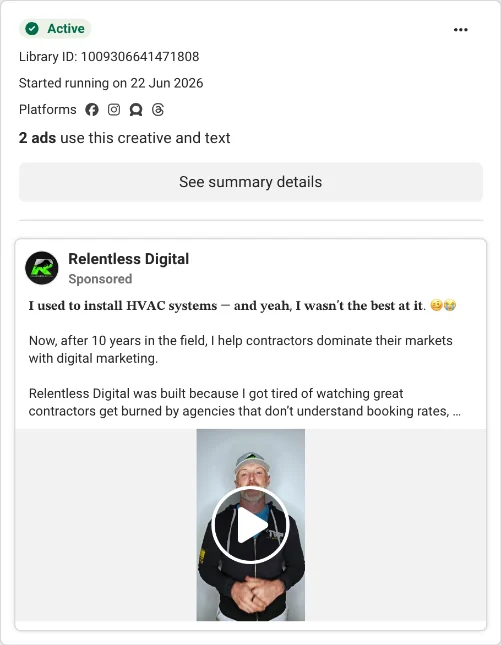
1. The insider who used to do the job
Relentless Digital opens with a confession: the founder used to install HVAC systems, “and yeah, I wasn’t the best at it”. The ad says the agency only works with HVAC, plumbing, electrical and roofing companies, and it names the thing those owners care about: booking rates. The lesson: a contractor trusts someone who has stood in a crawl space.
2. The niche specialist
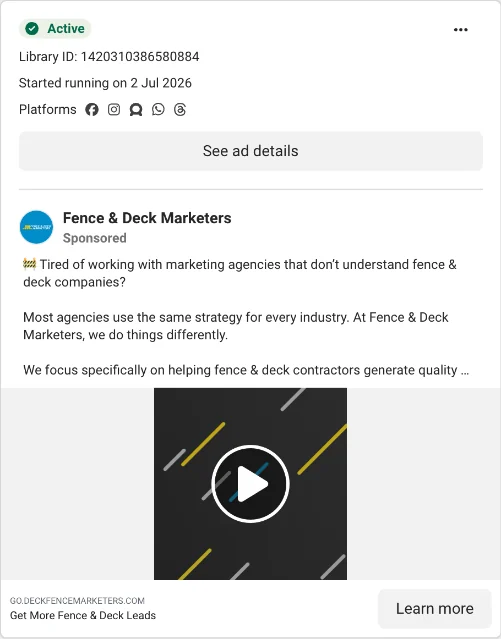
Fence & Deck Marketers asks one question: “Tired of working with marketing agencies that don’t understand fence & deck companies?” The whole ad is the niche. The headline under the video says “Get More Fence & Deck Leads”. No list of services, no “we do everything”.
3. The risk reversal
Tridas talks to painting contractors and leads with a guarantee: if you don’t land projects, you don’t pay. Then it promises two things the reader wants before a call: how the system works, and proof it works. Three ads use this creative and text, a sign the agency is testing it at scale.
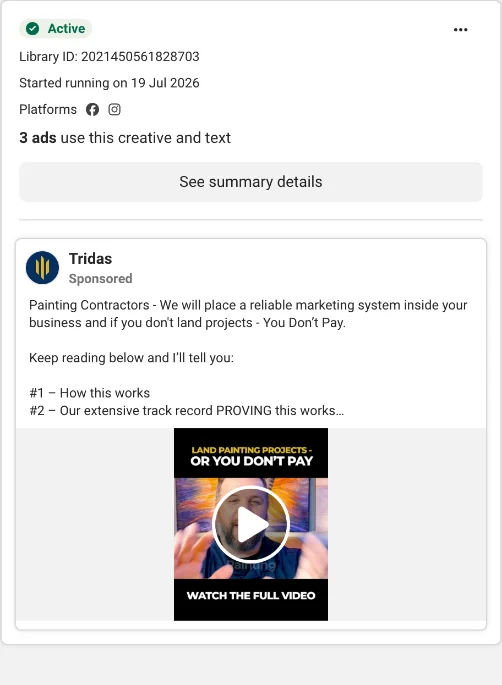
A guarantee like this only works if the agency controls what happens after the lead arrives. If the client’s office calls back the next morning, the agency pays for it.
4. The free training
Digital Shift targets home service businesses tired of hearing “spend more on ads”. The offer is a free training on getting more from the marketing they already pay for. It qualifies the prospect (home service owner, frustrated with ad costs) before any sales call.
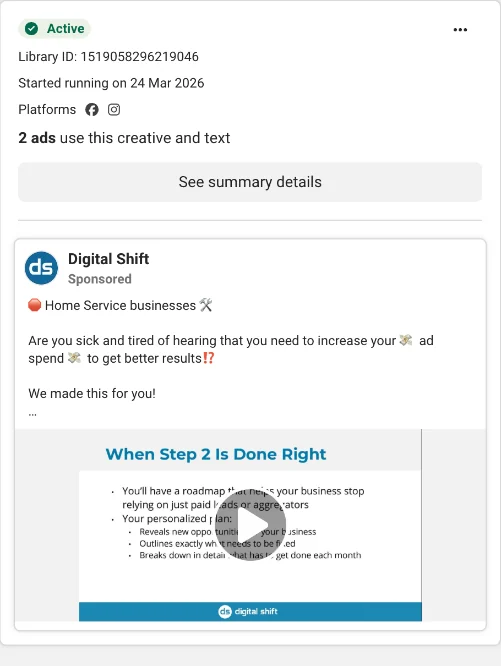
Put the four side by side and a pattern shows. Each one picks a trade. Each one sounds like it understands the trade. Two of them sell the outcome after the lead (booked jobs, landed projects), not the lead itself. Clients buy this promise, so you have to keep it.
What agencies run for their clients
Agency-built client ads leave fingerprints. Here are two cleaning companies, one in Greater Vancouver and one in Orange County, running almost word-for-word the same ad: “your ‘days off’ shouldn’t feel like a second shift”, $50 off the first clean, and a promise to call back today with a custom quote.
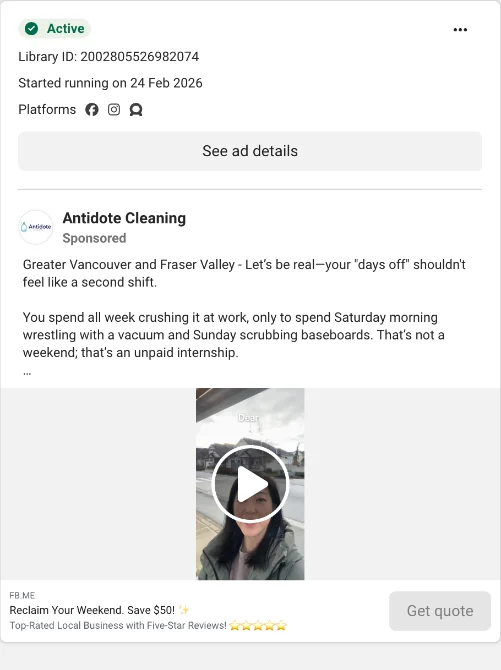
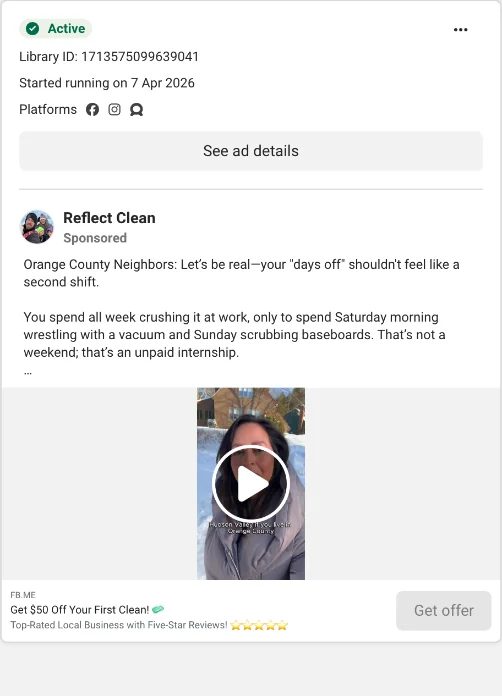
This is how a niche agency scales: one proven ad, one proven form, rolled out client by client with the city name swapped. It works. But notice the promise in the copy: “we’ll call you today with a custom quote”. The template only holds up if every client’s team sees every lead the moment it lands. Copy scales in a minute. Follow-up does not, unless you build it into the setup.
How agencies charge for lead generation
Your pricing model decides how much the client’s follow-up matters to your income.
| Model | How it works | Risk sits with | Why delivery matters |
|---|---|---|---|
| Monthly retainer | Fixed fee for managing ads, client pays ad spend | The client | Slow follow-up makes your leads look bad at renewal time |
| Pay per lead | A set price for each lead delivered | Shared | Clients dispute leads they never reached |
| Pay per appointment | Paid when a lead books a call or visit | The agency | Every lead not called is income you lose |
| Performance guarantee | Refund or free months if targets are missed | The agency | You need proof of when each lead arrived and where it went |
The further down the table you go, the more you need to control what happens in the first five minutes after a form is sent.
Deliver leads clients keep paying for
Here is the conversation every lead gen agency has had. The client says the leads are bad. You check the campaign and the leads look fine: real names, real phone numbers, the right ZIP codes. The problem is when they were called.
Meta lead ads make this easy to get wrong. Instant form leads sit in Meta’s Leads Center until somebody checks. Leads Center sends no instant alert for each new lead, and it is not in the Meta Business Suite mobile app. Meta also deletes instant form lead data after 90 days, so a client who forgets to download their leads loses them. Even big CRM tools are not instant: HubSpot’s own help docs say its Facebook lead sync takes up to two hours.
Two hours is long enough for a homeowner to book someone else. Read our breakdown of speed to lead for what the research says about the first five minutes.
Get the right access first
Ask for partner access to the client’s business portfolio, not their login. The client keeps ownership of the Page and ad account, and your agency works on them from your own portfolio. For lead data, Page access is the part agencies miss. Ad account access alone does not let you read leads. Your business needs a role on the client’s Page plus Leads Access, and only the business owning the Page grants it. The client assigns it in Meta Business Suite > Settings > Integrations > Leads access.
Give every client their own route
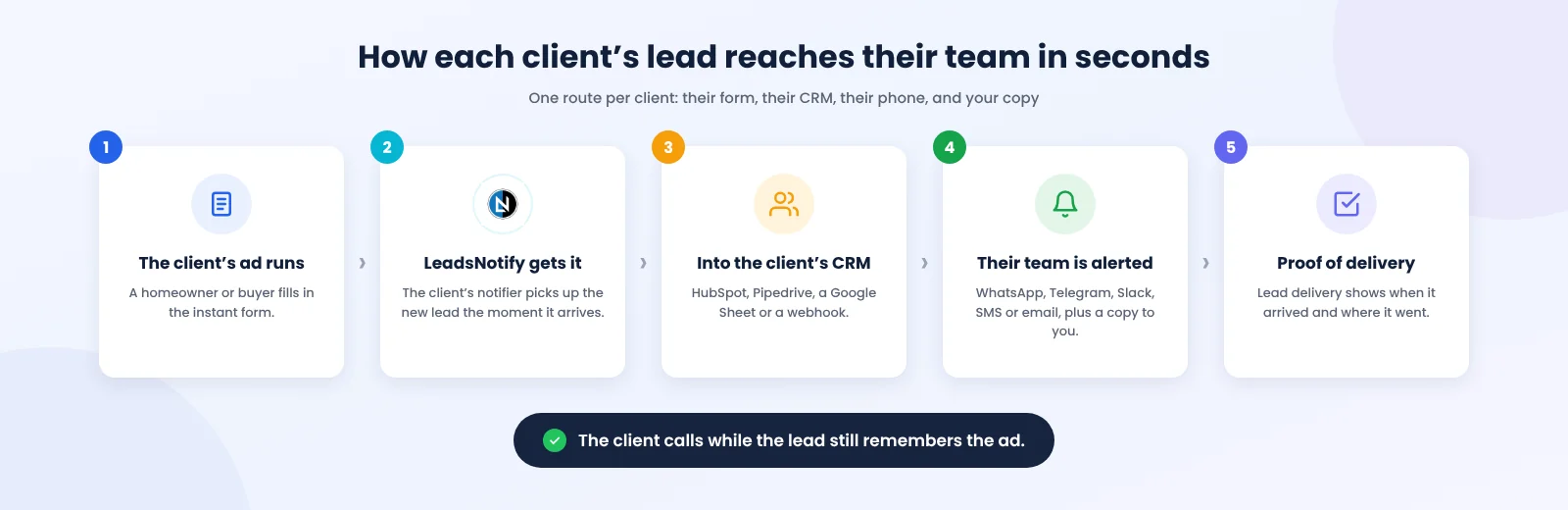
One client, one route. The route is three things: where the leads come from, where they go, and who gets told.
- Source: the client’s Facebook Page, Instagram forms, LinkedIn Page, TikTok advertiser account or Google Ads lead form.
- Destination: the client’s own CRM or sheet. HubSpot, Pipedrive, Zoho CRM, Brevo, a Google Sheet for clients without a CRM, or a webhook for anything else.
- Alert: the phone of whoever calls the lead back. A WhatsApp, Telegram or SMS alert for a business owner on a job site. A Slack channel for a sales team.
Add your agency’s own inbox as a second destination on every route. You see every lead without logging into the client’s CRM, and you know about a problem before the client does.
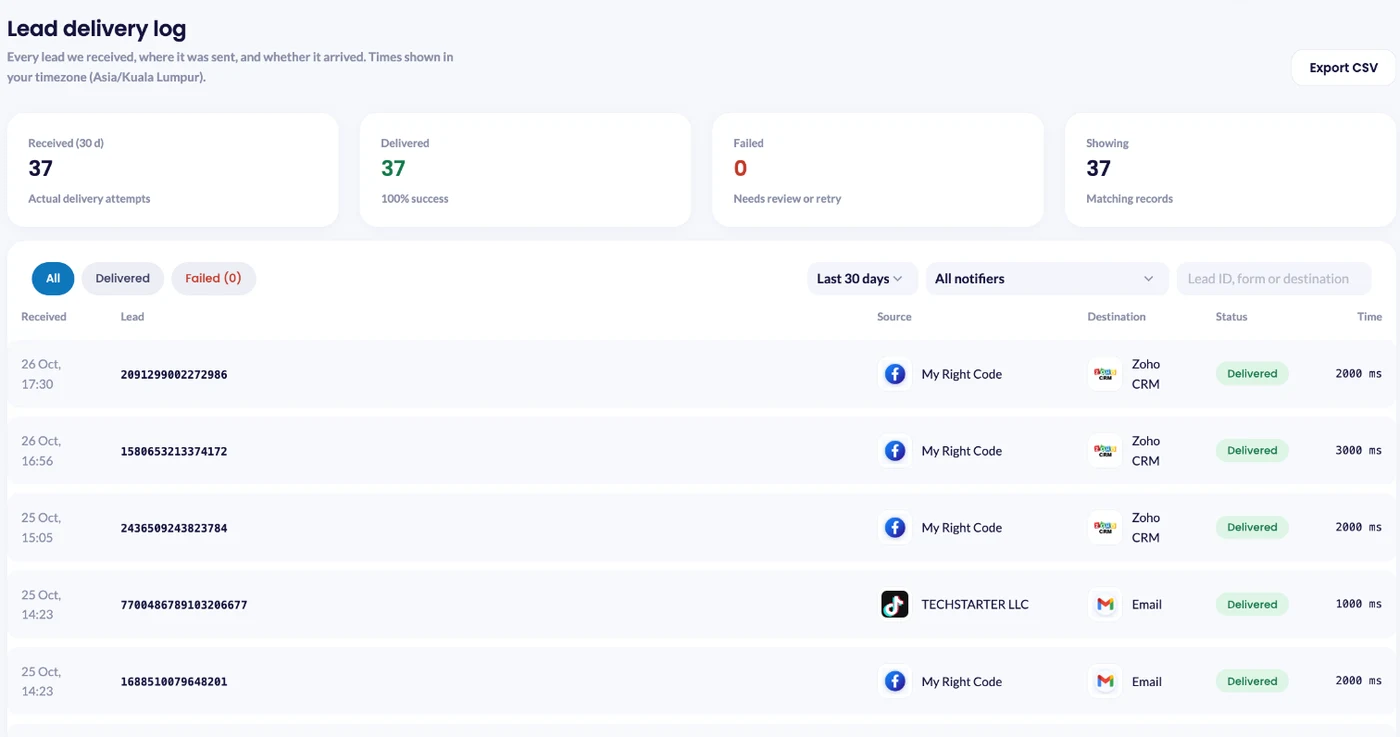
Keep proof of delivery
When a client says “we never got that lead”, you need an answer in one minute, not a support ticket with Meta. A delivery log with the time each lead arrived, the form it came from and where it went turns an argument into a fact. LeadsNotify keeps this in Lead delivery.
Client onboarding checklist for lead gen agencies
- Get partner access to the ad account and the Page, and ask the client to assign Leads Access.
- Agree the destination before launch: which CRM, which pipeline stage, which person gets the alert.
- Build the instant form with one or two qualifying questions the client’s sales team asked for.
- Add hidden fields for campaign and ad name, so leads in the CRM match your report.
- Connect the client’s source and create a notifier for each form.
- Save the notifier, click Send test lead, then check Lead delivery. Do it on the kickoff call so the client sees a lead land on their phone.
- Agree a callback target with the client: first call within five minutes during business hours.
- Report on booked jobs, not only leads, from week one.
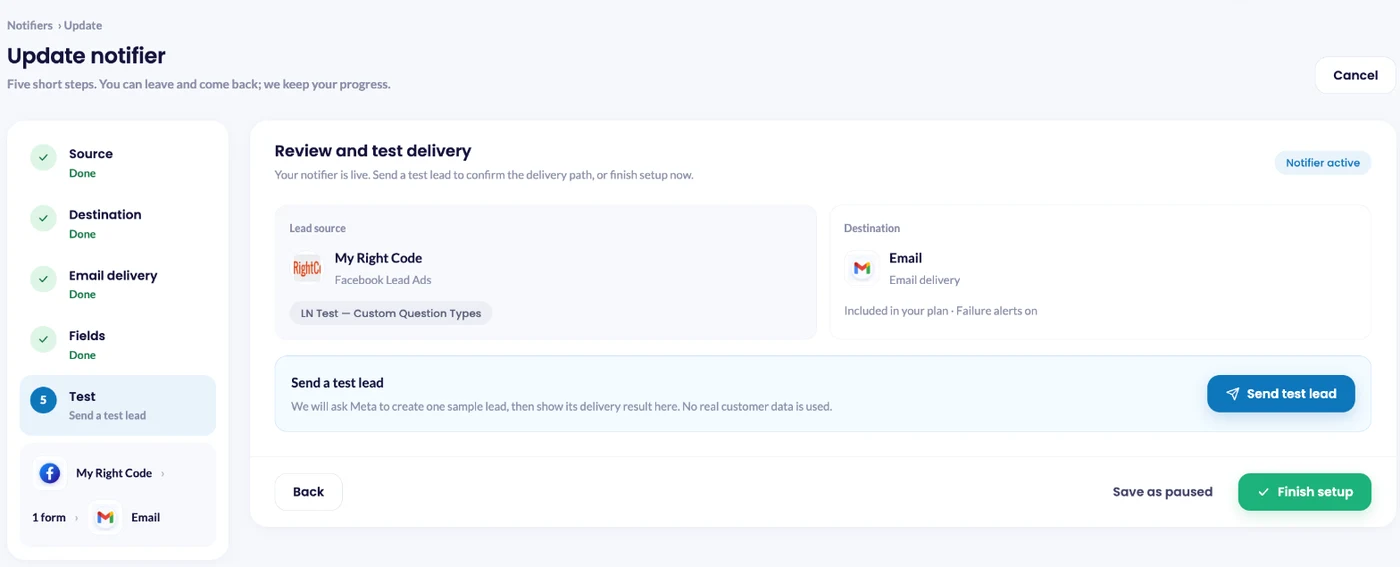
LinkedIn works differently: LeadsNotify cannot create LinkedIn test leads. For LinkedIn forms, send the test from LinkedIn Campaign Manager > Content & Assets > Lead generation forms > More > Send Test Lead.
What to report to clients
Cost per lead alone invites the “bad leads” argument. Report the whole chain, so both sides see where leads drop out:
- Leads: form submissions, by campaign.
- Cost per lead: ad spend divided by leads.
- Time to first call: how long the client’s team took to reach each lead.
- Contact rate: the share of leads the team spoke to.
- Booked rate: the share of leads who booked an appointment, quote or visit.
- Cost per booked job: ad spend divided by booked jobs. The number the owner cares about.
Say a client spends $3,000 in a month and gets 120 leads, a $25 cost per lead. If their team reaches 60 of them and books 18, the cost per booked job is about $167. Get the alert onto the right phone so the team reaches 90 of those 120, and at the same booking rate the cost per booked job drops to about $111. Same ads, same budget. The difference is the gap between the form and the phone call.
Where LeadsNotify fits
LeadsNotify is the delivery step. It picks up each lead from Facebook, Instagram, LinkedIn, TikTok and Google Ads lead forms and sends it to the client’s CRM, sheet or inbox seconds after the form is submitted, with an alert to WhatsApp, Telegram, Slack, SMS or email for whoever calls back. Set it up in minutes. No code.
For agencies, the parts worth knowing:
- One account for every client. The Agency plan includes unlimited lead sources, notifiers and team members, so adding a client does not change your bill.
- Each lead counts once, no matter how many places it goes. Client CRM, client phone and your agency inbox is still one lead.
- Your name on the alerts. Remove LeadsNotify branding on paid plans, so notifications look like they come from your agency.
- One delivery log for every client, so “where did that lead go?” takes a minute to answer.
See the full agency setup or compare plans on the pricing page.
Your ads are working. Make sure the leads are too. Connect your Facebook Page, pick your lead form, and choose where each lead goes. Set it up in minutes. No code.
FAQ
What is the best lead generation strategy for a marketing agency?
Pick one niche, run ads and outreach speaking to it, and lead with proof from clients in the same trade. Then protect renewals by making sure every client’s leads reach their team in seconds, not hours.
Should an agency charge per lead or a monthly retainer?
A retainer is safer for the agency. Pay per lead and pay per appointment are easier to sell but put the risk on you, so only offer them when you control lead delivery and keep proof of when each lead arrived.
How do I get access to a client’s Facebook leads?
Ask the client to give your business portfolio partner access to their Page and ad account, then assign your business Leads Access in Meta Business Suite > Settings > Integrations > Leads access.
How do I stop clients saying the leads are bad?
Track time to first call and contact rate alongside cost per lead. Many “bad lead” complaints come down to slow follow-up. Send each lead to the client’s phone the moment it arrives and keep a delivery log both of you trust.
Can I manage many clients from one LeadsNotify account?
Yes. Each notifier is its own route from one client’s form to the same client’s destinations, so leads never cross between clients. The Agency plan has unlimited lead sources and notifiers.
Last Updated on November 20, 2026 by Akash Mehra
Set up a free notification in a few minutes.