Home Service Leads: Where to Get Them and How to Win the Job (Real Ads)
Where home service leads come from, real HVAC, plumbing, cleaning and garage door ads running on Meta right now, three lead ads to copy, and the follow-up setup that wins the first call.
 By Akash Mehra
13 min read
Table of contents
Key takeaways
- Home service leads come in four speeds: emergencies, repairs, big installs and recurring services. Each needs a different callback time.
- Shared lead marketplaces send the same homeowner to several pros. Leads from your own ads go to you alone.
- The home service ads running on Meta right now lead with a local name, a clear offer and a reason to trust them. None lead with a price list.
- The job goes to whoever calls first. Get every lead onto the phone of the person who calls it back, seconds after the form is sent.
A pipe bursts at 7pm. The homeowner grabs their phone, finds three plumbers, fills in three forms and waits.
The first plumber to call gets the job. The other two get “thanks, we already have someone coming”.
Home service leads are won or lost in this gap. This guide covers where home service leads come from, what each source costs you in control, real ads home service companies are running on Meta right now, and the follow-up setup putting you on the phone first.
What counts as a home service lead
A home service lead is a homeowner who needs work done on their home and gave you a way to reach them. Name, phone and address at minimum. The address tells you the service area, the drive time and which tech is closest.
Home service leads come in four types, and each one has its own clock:
| Lead type | Examples | How fast to call |
|---|---|---|
| Emergency | Burst pipe, no heat, AC down in a heatwave, garage door stuck shut | Minutes. The homeowner calls the next company if you don’t. |
| Repair | Leaking tap, broken spring, faulty outlet, noisy furnace | Same hour. Usually decided the same day. |
| Project or install | New HVAC system, garage door, kitchen remodel, fence | Same day. Quotes from three companies, decided over weeks. |
| Recurring | House cleaning, lawn care, pest control, pool service | Same day. Win the first visit and you keep the customer for months. |
Your lead form tells you which type you are dealing with. One multiple-choice question (“What do you need?”) is enough to send emergencies to the on-call tech and installs to the estimator.
Where home service leads come from
Every source sits somewhere between “you own the lead” and “you rent it”. Here are the main ones.
| Source | Who else gets the lead | Time to start | Best for |
|---|---|---|---|
| Facebook and Instagram lead ads | Nobody. The homeowner asked to hear from you. | Same day | Offers, seasonal pushes, recurring services |
| Google Local Services Ads | Shown next to other local pros | Days, after screening | Emergency and repair searches |
| Google search ads and SEO | Nobody, once they click your site | Ads in days, SEO in months | High-intent “near me” searches |
| Shared lead marketplaces | Often several other pros | Days | Filling the calendar while your own channels grow |
| Referrals, yard signs and Nextdoor | Nobody | Builds over time | Trust. The best closing rate you will get. |
| Door hangers and canvassing | Nobody | Immediate | Following a job into the rest of the street |
Shared leads vs leads you own
Marketplaces such as Angi, HomeAdvisor and Thumbtack charge per lead. Angi says a homeowner’s request is matched with up to five pros, depending on the lead type and service area, and you pay whether or not you win the job. The model only pays if you are first to respond, because the homeowner hears from several companies at once.
A lead from your own ad is different. The homeowner saw your name, your offer and your reviews, and chose you. You still have to call fast, because they often fill in a second form, but you start the race in front.
Most growing home service businesses use both: marketplaces to fill gaps, their own ads and referrals to build a pipeline nobody else gets a copy of.
Why Facebook and Instagram lead ads suit home services
Meta lead ads open a short, pre-filled form inside Facebook or Instagram. A homeowner requests a quote in two taps without leaving the app. Our guide to setting up Facebook instant forms walks through the form, and the same form runs on Instagram lead ads.
Three reasons they fit trades:
- Local targeting. Aim at the ZIP codes your vans cover, and nowhere else.
- Seasonal control. Turn on AC tune-ups in May and furnace checks in October. Pause when the crews are booked.
- Offers work. A $49 tune-up or $50 off a first clean gets a homeowner to act before they need you in an emergency.
The catch is where the leads land. Instant form leads sit in Meta’s Leads Center until you download them or connect a tool. Leads Center sends no instant alert for each new lead, and it is not in the Meta Business Suite mobile app. Meta also deletes instant form lead data after 90 days. A tech under a sink is not checking a desktop dashboard.
Real home service ads running on Meta right now
The Meta Ad Library is the public archive of every ad running on Facebook and Instagram. Search your trade plus “free estimate” and your state, and you see what local competitors run and how long each ad has been live. An ad running for months is an ad paying for itself.
Here is what we found live in the US on 19 November 2026. Every one below sends the homeowner to an instant form. Click any screenshot to see the ad in the Ad Library.
1. HVAC: the financing offer running for over a year
Veteran’s Choice Plumbing Heating and Air opens with the area (“Riverside County residents!”) and stacks the reasons to act now: $67 a month, $0 down, 10% off for veterans and first responders, and a free wifi thermostat with every install. The button says Get quote. This ad started on 29 October 2025 and is still running, which tells you it books jobs.
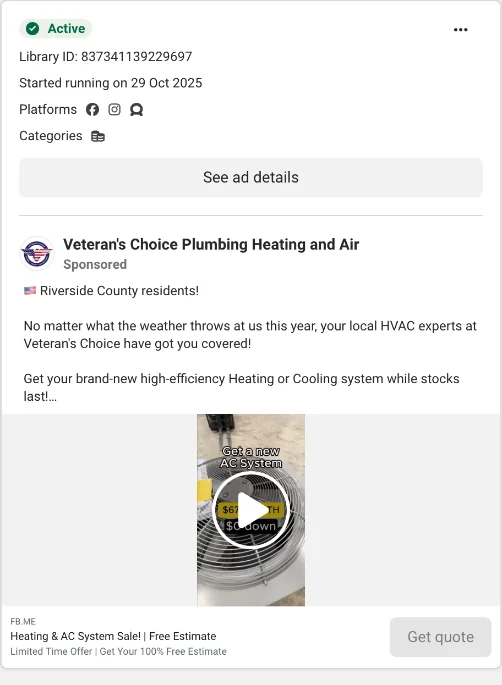
The lesson: a new HVAC system is a big number. Turn it into a small monthly one and the homeowner fills in the form instead of putting it off.
2. Cleaning: the time-back offer with a callback promise
Reflect Clean sells time, not cleaning: “your ‘days off’ shouldn’t feel like a second shift”. Then the offer: $50 off the first clean, a free fridge or oven add-on, limited to the first 10 neighbours who book by Sunday. The last line makes a promise: “we’ll call you today with a custom quote.”
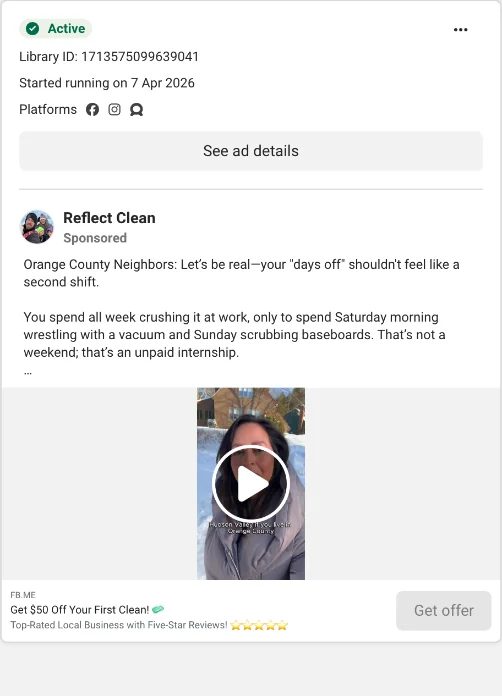
A company in Greater Vancouver runs almost the same copy, a sign of an agency template. Templates work. The promise inside this one (“we’ll call you today”) only works if the lead reaches someone’s phone today.
3. Plumbing: the family story
Methodical Plumbing Services skips the offer and builds trust: “Meet Ezra. He’s proud of his dad, Joseph.” The video shows a real plumber and his son, then the proof points: licensed plumbers, 24 hour emergency plumbing, same day service when available. The headline is simple: “A Company You Can Trust”, with a five-star rating.
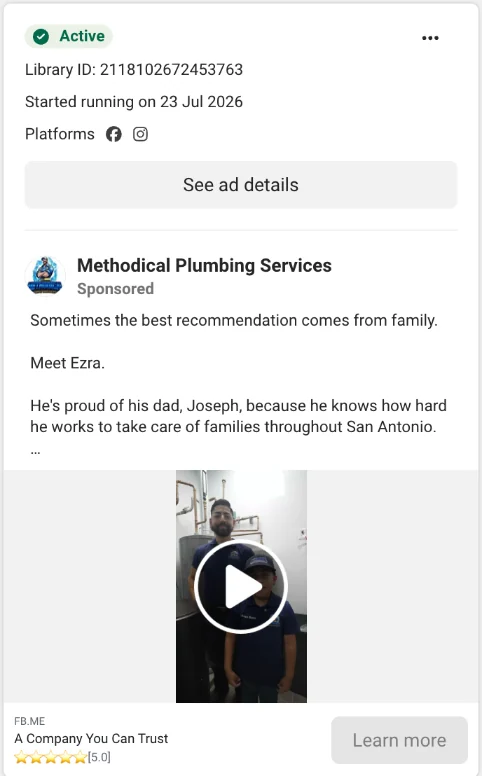
The lesson: homeowners let you into their house. A real face beats a stock photo of a smiling plumber.
4. Garage doors: one ad per city
Ace’s Garage Door Repair & Installation runs the same offer in separate ads for San Francisco, Palo Alto, Dublin, Fairfield and Fresno, each opening with the city in capitals. The hook is fear of a bigger bill: “one broken spring away from a $500+ repair”. The offer is a $49 tune and lube with a six-point checklist.
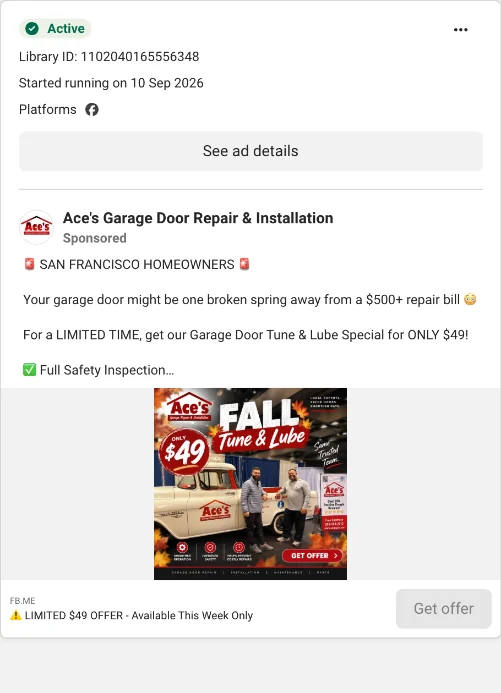
The lesson: a small maintenance offer gets you in the garage. The homeowner with a worn spring becomes the replacement job.
5. Garage doors: reviews and a big-ticket discount
Duke’s Garage Doors leads with proof: “More than 7,000 five-star reviews didn’t happen by accident.” Then a clear offer on the big job: $300 off a two-car door, $150 off a single, and a free 30-year warranty. The headline ties it to the region: “Florida Tough. Duke’s Backed.”
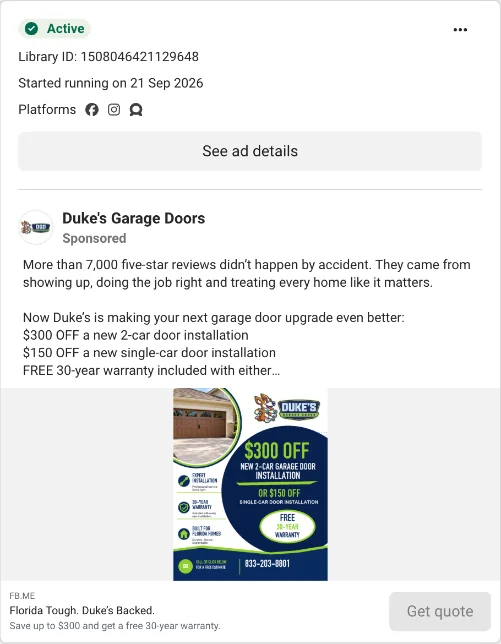
Put the five side by side and the pattern is plain. Every one names a place. Every one has a reason to act this week. Every one gives the homeowner a reason to trust a stranger. None of them lists prices for services, because the quote happens on the phone call.
Three home service lead ads to copy
Meta gives you two instant form types. More volume is the two-tap default: cheapest leads, more junk. Higher intent adds a review screen before the form is sent: fewer leads, fewer fakes. Use more volume for recurring services and small offers. Use higher intent for big installs, where one good lead is worth a lot.
Keep forms short. Name, phone and ZIP code, plus one or two multiple-choice questions.
1. The emergency and repair ad
- Creative: a phone video of you or a tech in a real local home. Say the town in the first three seconds.
- Primary text: “[Town] homeowners: no heat, a leak or a door that won’t open? We answer fast and give you a price before we start. Same day service when available.”
- Headline: “Get a fast quote from a local pro”
- Button: Get Quote.
- Form questions: “What do you need?” (emergency today / repair this week / quote for new install), ZIP code, phone.
2. The maintenance offer
- Creative: a before and after, or a tech running through a checklist.
- Primary text: “Most [furnace / garage door / water heater] breakdowns start as small problems. Book a $[price] tune-up this month and we’ll check [three things] and tell you straight what needs fixing.”
- Headline: “$[price] tune-up, this month only”
- Button: Get Offer.
- Form questions: “Roughly how old is your system?” (under 5 years / 5 to 15 / 15+ / not sure), “Do you own the home?” (yes / no), phone.
3. The big install ad
- Creative: a finished job in a local street, same angle before and after.
- Primary text: “Thinking about a new [system / door / fence]? Get a free written quote, monthly payment options and a warranty in writing. [Number] local reviews.”
- Headline: “Free quote on a new [product]”
- Button: Get Quote.
- Form questions: “When are you hoping to do the work?” (this month / 1 to 3 months / just pricing), “Do you own the home?” (yes / no), phone.
The “Do you own the home?” question earns its place. Renters cannot approve a new system or a new door. Filtering them in the form saves a wasted truck roll.
Win the first call
Your ad does not win the job. Your callback does.
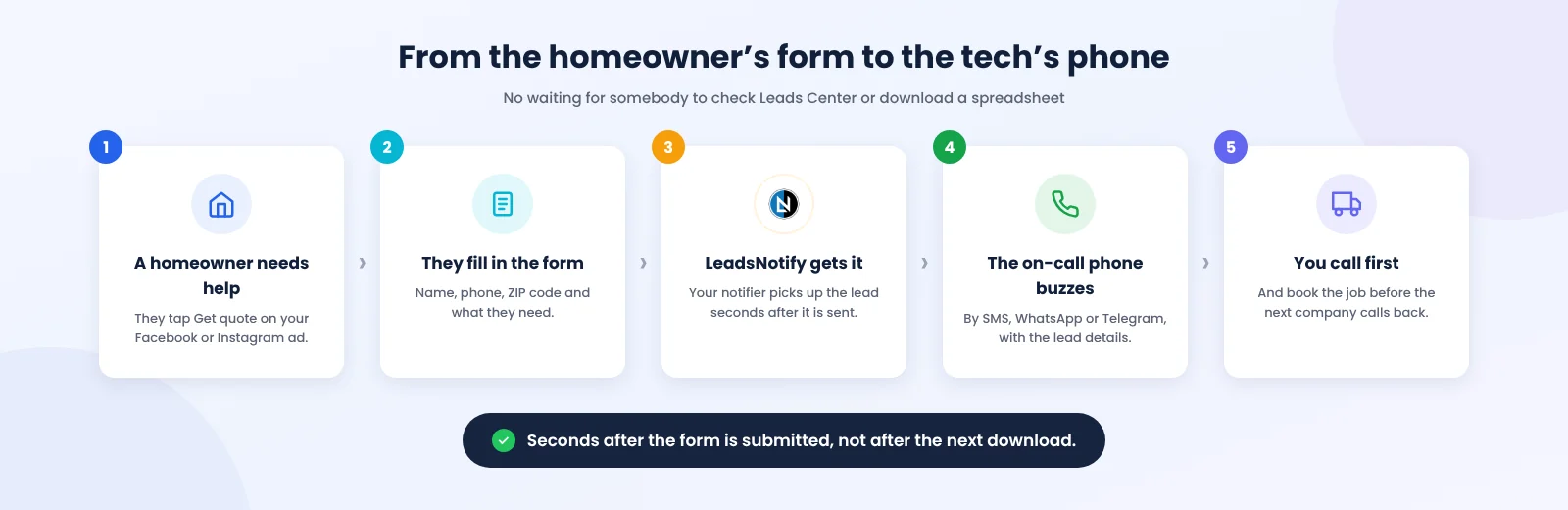
Look at how most home service leads move. Leads sit in Leads Center until somebody checks. The office downloads a spreadsheet at lunch. Even CRM tools are not instant: HubSpot’s own help docs say its Facebook lead sync takes up to two hours. Our speed to lead guide covers what the research says about the first five minutes.
A worked example
Say you run an HVAC company with five techs and one office manager. In October you spend $2,000 on furnace tune-up ads and get 64 requests.
The old routine: the office manager checks Leads Center at 9am and 2pm. A lead from 10am waits four hours. The techs are on jobs and see nothing until the office calls them. By the afternoon, a good share of those homeowners have booked with whoever called first.
The new routine: the second a homeowner submits the form, the lead lands in three places. A text or WhatsApp alert goes to the on-call tech’s phone. The lead goes into your job management software or a shared sheet, with the answer to “What do you need?” attached. The office gets an email copy. “No heat today” leads get a call while the homeowner is still standing next to a cold radiator.
Same ads. Same budget. The only change is the gap between the form and the phone call.
Route each lead to the person who calls
A lead in a spreadsheet is a task for later. A lead on a phone is a call now. Four routing patterns for home services:
- Emergencies to the on-call phone. Send every lead to the person on call by SMS or WhatsApp. Techs in a crawl space read texts. They do not read email.
- Every lead to your system of record. Your CRM or a Google Sheet, with ZIP code, campaign and service type attached, so you know which ad booked which job. If your team runs on job management software such as ServiceTitan, Jobber or Housecall Pro, send leads to it with a webhook.
- The crew chat. If your crews run the day in a Telegram group or a Slack channel, post new leads there. Whoever is closest claims it.
- One form per service. Separate forms for repairs and installs let you send each to a different person: repairs to dispatch, installs to the estimator.
The home service follow-up cadence
The first call is the start. Installs and recurring services take several touches.
- Minute 0 to 5: call. If no answer, text right away and reference the form. “Hi Maria, it’s Dan from [company]. You asked about a furnace tune-up. We have a tech near you tomorrow at 9 or 1. Which works?”
- Same day: a second call in the evening, when people are home.
- Day 2: a short text with one review or a photo of a recent local job.
- Day 4: a last call, then a text: “Should I close this out, or do you still want the quote?”
- After the job: ask for a review the same day, and add them to your seasonal maintenance list.
Stop when they book or say no. Five touches over a week is persistent. Fifteen is a complaint.
Track cost per booked job, not cost per lead
Cost per lead tells you what the ads cost. Cost per booked job tells you whether they pay.
In the example above, $2,000 for 64 leads is $31 a lead. If the office reaches 30 of them and books 14 tune-ups, each booked job cost about $143. If instant alerts help the team reach 48 of the 64, and the same share book, the result is 22 jobs at about $91 each. Track both numbers every month, by campaign, and you know which ads to scale before the busy season.
Where LeadsNotify fits
LeadsNotify picks up each Facebook, Instagram, TikTok or Google Ads lead and sends it straight to your CRM, spreadsheet and inbox seconds after the form is submitted. Add a text, WhatsApp, Telegram or Slack alert for the people who call back. Set it up in minutes. No code.
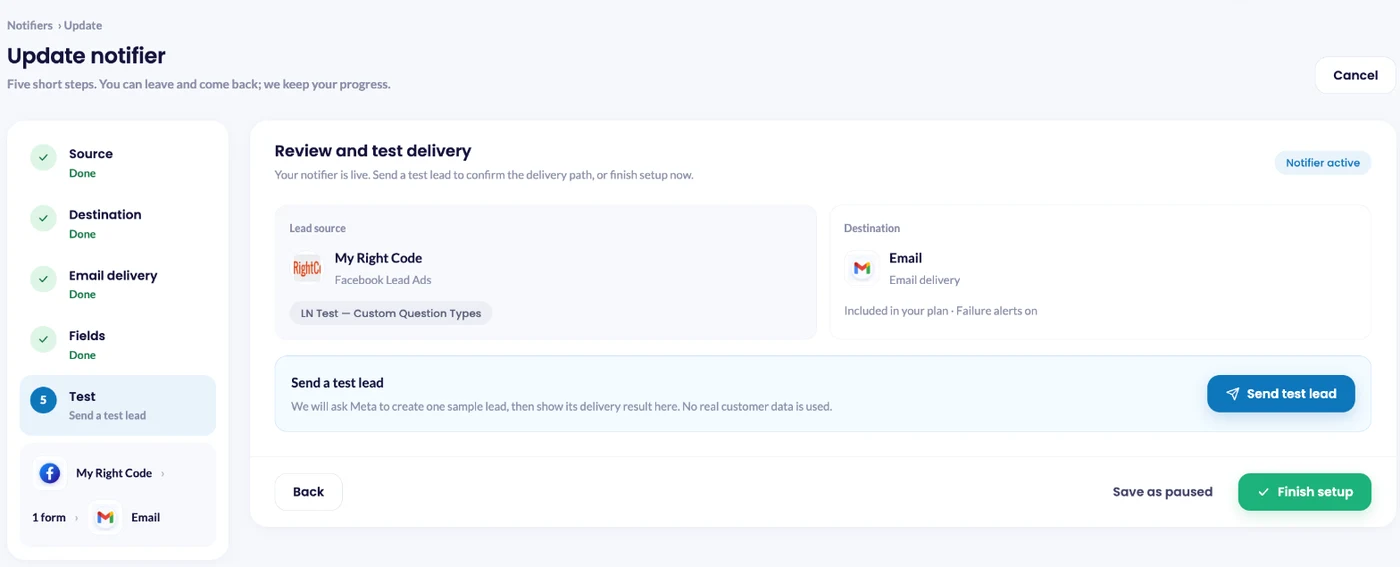
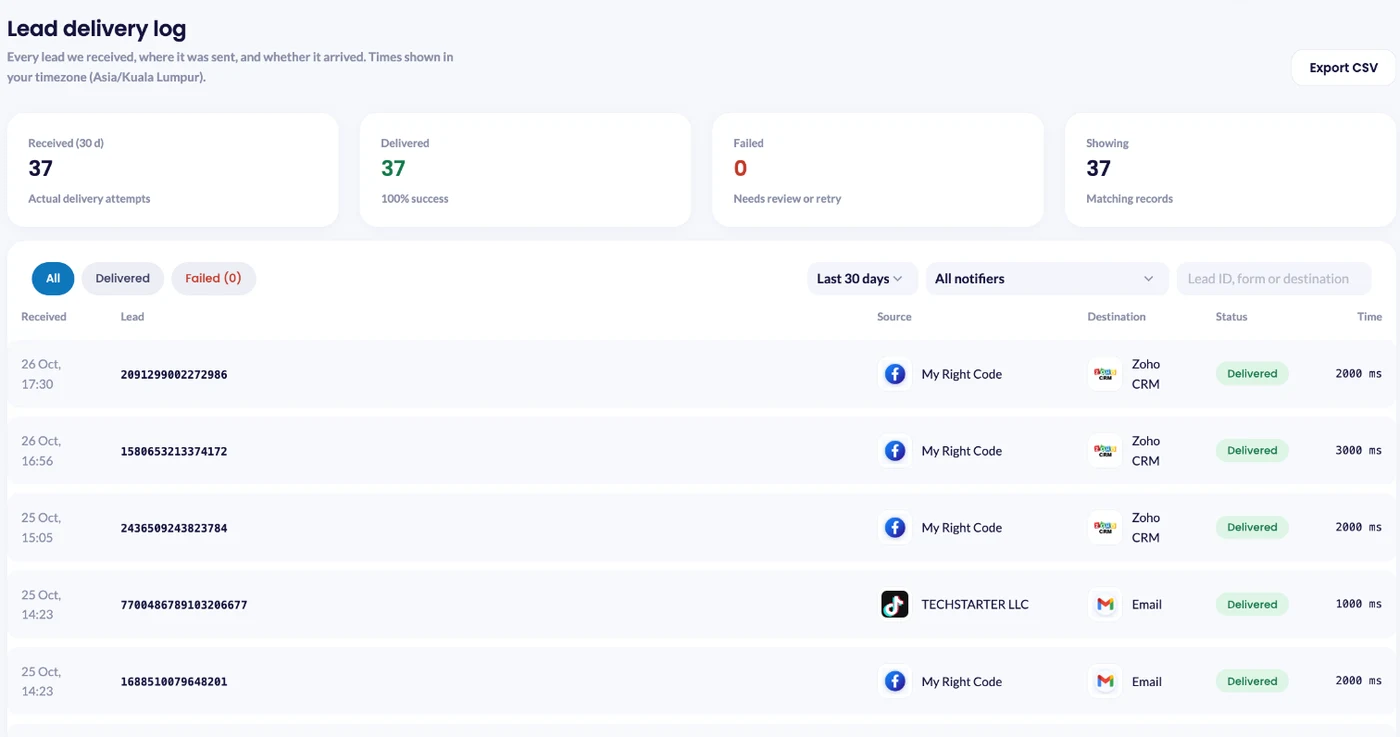
Before you run ads, test the whole path. Save the notifier, click Send test lead, then check Lead delivery.
Lead delivery shows every lead and exactly where it went, so when a homeowner says “I filled in your form last week”, you check in seconds.
Telegram, Slack and email alerts work on every plan, free included. WhatsApp and SMS alerts use prepaid alert credit. See the home services setup or start on the free plan.
Your ads are working. Make sure the leads are too. Connect your Facebook Page, pick your lead form, and choose where each lead goes. Set it up in minutes. No code.
FAQ
What is the best source of home service leads?
Leads from your own ads and referrals, because no other company gets a copy. Shared marketplaces fill gaps, but you compete with several pros for each homeowner.
How much do home service leads cost?
It depends on the trade, the market and the season. Track cost per booked job instead of cost per lead: a cheap lead nobody reaches costs more than an expensive lead you book.
Do Facebook ads work for home service businesses?
Yes, for offers, seasonal pushes and recurring services. Lead ads let a homeowner request a quote in two taps. The results depend on how fast you call back.
How fast should I respond to a home service lead?
Within five minutes during business hours for emergencies and repairs, and the same day for installs and recurring services. Send each lead to a phone, not a dashboard, so nobody waits for the next check.
How do I get Facebook leads into ServiceTitan, Jobber or Housecall Pro?
Use a webhook to send each lead to the tool, or send leads to a Google Sheet or email inbox your office already works from. Check your software’s documentation for the webhook or lead intake option it supports.
Last Updated on November 20, 2026 by Akash Mehra
Set up a free notification in a few minutes.