
Mortgage Lead Generation: How Loan Officers Get and Close Leads
Where mortgage leads come from, real lender ads running now, the Meta ad rules for financial services, and the follow-up that reaches borrowers first.
 By Akash Mehra
13 min read
By Akash Mehra
13 min read
Table of contents
A borrower fills in a rate form at 9pm on a Sunday. Then she fills in two more.
On Monday morning, three loan officers call her. One of them already called on Sunday night, answered her question about down payments, and booked a pre-approval call for Tuesday. The other two are leaving voicemails.
Mortgage lead generation has two halves: getting the right borrower to raise their hand, and being the first loan officer they talk to. We went through the Meta Ads Library and pulled live lender ads to show what is working right now, the ad rules you have to follow, and the follow-up that gets you to the borrower first.

What counts as a mortgage lead
A mortgage lead is a person who wants to buy, refinance or borrow against a home and gave you a way to reach them. Name, phone and email at minimum. What matters as much as the contact details is the type of loan and the timeline.
Mortgage leads fall into four main types:
- Purchase leads: first-time buyers and movers who need a pre-approval. Often shopping with a real estate agent. Timeline set by the home search.
- Refinance leads: homeowners chasing a lower rate or a shorter term. Very rate-sensitive. They compare several lenders at once.
- Home equity leads: owners who want cash but do not want to give up a low first-mortgage rate. HELOCs and second mortgages.
- Investor leads: people buying rentals who care about cash flow more than the rate.
Each type needs a different first call. A first-time buyer wants guidance. A refinance lead wants a number. Ask the loan type in your form and you know which conversation to start.
Where mortgage leads come from
1. Facebook and Instagram lead ads
The fastest channel to switch on and the easiest to target by area. Meta lead ads open a short, pre-filled form inside Facebook or Instagram. A renter scrolling at night requests a pre-approval check in two taps. Our guide to setting up Facebook instant forms walks through the form itself.
The catch is the same in every industry. Instant form leads sit in Meta’s Leads Center until you download them or connect a tool. Leads Center sends no instant alert for each new lead, and it is not in the Meta Business Suite mobile app. Meta also deletes instant form lead data after 90 days.
2. Real estate agent partners
The classic purchase channel. Agents send buyers who need pre-approval. These leads convert well because someone the borrower trusts recommended you. They also come with a deadline: the agent wants an answer fast so the buyer can make offers. Co-marketing with agents (shared ads, shared first-time buyer classes) turns one relationship into a steady lead source. Our guide to Facebook ads for real estate shows what your partner agents are running.
3. Your past clients and database
Every past borrower is a future refinance, a future move, or a referral. Rate drops are the trigger. A short “rates moved, here’s what it means for your loan” message to past clients often produces more refinance leads than any ad.
4. Your website and rate tools
Rate quote forms and mortgage calculators on your own site. Higher intent than social leads, because the visitor was already researching. Make sure these leads go to the same place, at the same speed, as your ad leads.
5. Bought mortgage leads
Lead marketplaces sell mortgage leads by the piece, and the same borrower is often sold to several lenders. That is why bought leads feel like a phone race. If you buy them, speed is the only thing that makes them pay. Leads from your own ads asked to hear from you.
Real mortgage ads running right now
Before you build your own ads, spend ten minutes in the Meta Ads Library, the public archive of every ad running on Facebook and Instagram. Search “pre-approval”, “refinance” or “home equity”. You will see which offers lenders run and how long each ad has been live.
Here is what we found on 12 October 2026. Every one of these was live in the US. Click any screenshot to see the ad in the Ads Library.
1. The second opinion on a pre-approval
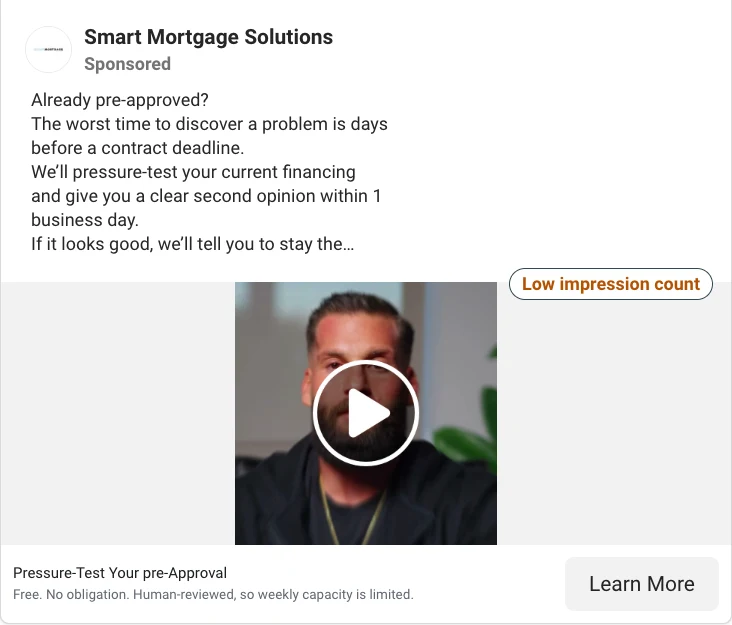
A mortgage company is talking to buyers who are already pre-approved somewhere else: “The worst time to discover a problem is days before a contract deadline.” It offers a free second opinion within one business day, and the small print adds a little scarcity: human-reviewed, so weekly capacity is limited. That is a smart way to win a borrower from another lender.
2. The free class
A loan officer is running a free first-time home buyer class on Zoom, with a date, a time and a Sign up button. “No sales pitch, just answers.” First-time buyers who sign up for a class are telling you they plan to buy, and roughly when.

3. The niche lead magnet
A loan officer is offering veterans a free 42-video VA loan course. The headline does the qualifying: “Feeling Ready to Buy and Being Ready to Buy Aren’t the Same Thing.” One narrow audience, one useful free thing, and a Sign Up button. Notice the NMLS number in the page name, too.

4. Keep your rate, use your equity
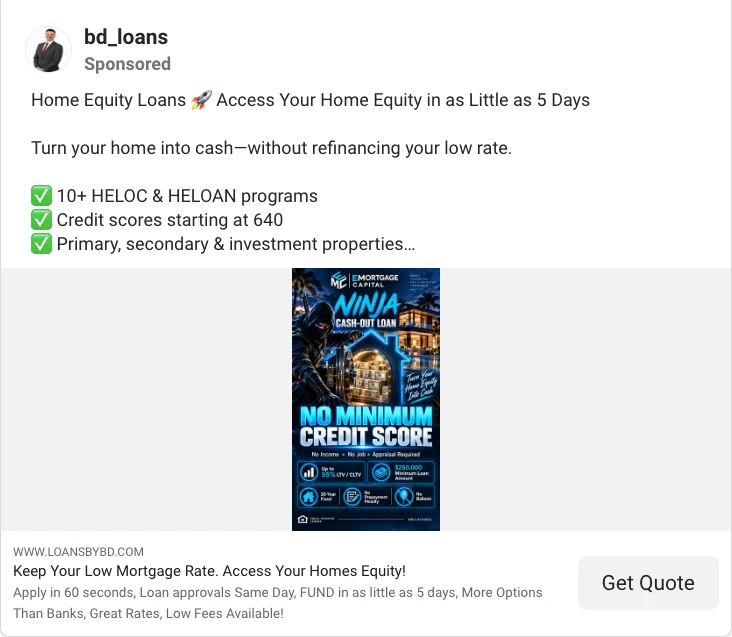
Two lenders are running the same angle for homeowners sitting on a low first-mortgage rate. One leads with Find Your Rate for Free in 5 Minutes for a home equity line of credit. The other says it outright: Keep Your Low Mortgage Rate. Access Your Home’s Equity! Plenty of owners locked in a low rate and have no wish to refinance. These ads talk to exactly that worry.
5. The rate with its APR
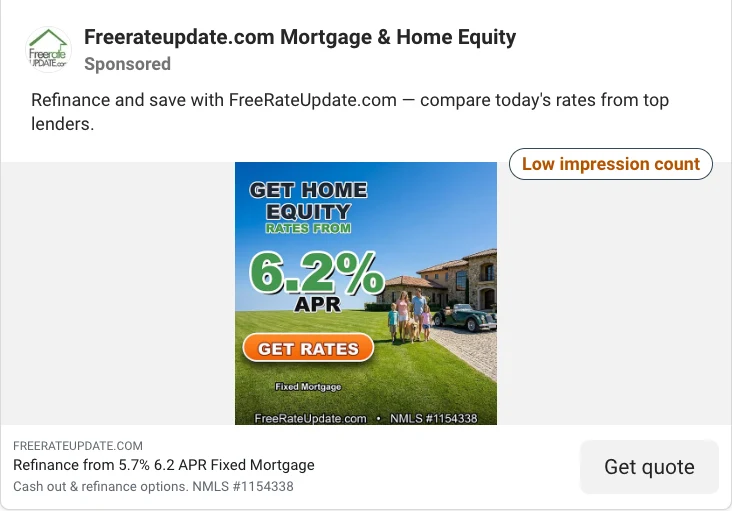
A rate comparison site is advertising “Refinance from 5.7% 6.2 APR Fixed Mortgage.” The creative shows the APR in big type, and the NMLS number appears in both the image and the description. That is not style. It is the advertising rules covered next.
The pattern across all of them: one clear reason to raise your hand, and a small first step. Not “apply now”. Check, learn, find out.
The rules for mortgage ads on Meta
Mortgage ads come with rules most other industries skip. This is general guidance, not legal advice. Check your own ads with your compliance team.
Meta’s special ad category. In the US, Meta requires ads for financial products and services to run under its “Financial products and services” special ad category, which became mandatory in early 2025. According to Meta’s documentation, these ads cannot target by age (the range is fixed) or gender, cannot use lookalike audiences, and lose detailed targeting exclusions. You cannot pick your borrowers by audience settings. So do the qualifying in the form instead.
The APR rule. Under Regulation Z, section 1026.24, an ad that states a rate of finance charge must state it as an annual percentage rate. That is why the rate ad above shows the APR. Other terms (like a payment amount or a down payment) can trigger extra disclosures too.
Your license number. Many states require your NMLS ID in advertising. Check your state’s rules and put it in the ad, the page name or the form’s privacy section, like the lenders above.
Consent to contact. If you plan to call or text, say so on the form and get clear consent. Meta lets you add a custom disclaimer to the instant form for exactly this.
What not to ask. Never ask for account numbers or Social Security numbers in a lead form. Ask for ranges instead: a credit range, a price range, a down payment range.
Three mortgage lead ads to copy
Meta gives you two instant form types. More volume is the default two-tap form: pre-filled fields, cheapest leads, more junk. Higher intent adds a review screen before the form is sent: fewer leads, more serious borrowers. In mortgage, where one closed loan pays for a lot of ads, higher intent is usually the better default.
1. The pre-approval check ad
- Creative: a short phone video of you explaining one thing buyers get wrong about pre-approval. Your face builds trust faster than a stock photo of a house.
- Primary text: “Thinking of buying in [area] in the next 6 months? Find out what you can afford before you fall in love with a house. Free pre-approval check, no hard credit pull to start.” (Only say “no hard credit pull” if that is true for your process.)
- Headline: “What can you afford?”
- CTA button: Learn More.
- Form questions: “When are you hoping to buy?” (0 to 3 months / 3 to 6 months / 6+ months), “Are you working with a real estate agent?” (yes / not yet), “Rough credit range” (excellent / good / fair / not sure), phone.
2. The home equity ad
- Creative: a simple graphic: “Keep your rate. Use your equity.”
- Primary text: “Locked in a low rate? You don’t have to give it up to pay for a renovation or clear high-interest debt. See how much equity you could access.”
- Headline: “Keep your rate, access your equity”
- CTA button: Get Quote.
- Form questions: “What’s the money for?” (renovation / debt / other), “Estimated home value” (ranges), phone.
3. The first-time buyer class ad
- Creative: a photo from a real class you ran, or a short clip of you at the front of the room.
- Primary text: “Free first-time buyer class, [date], [online or address]. Down payment help, credit basics and what pre-approval really means. Bring your questions.”
- Headline: “Save your seat”
- CTA button: Sign Up.
- Form questions: “Do you currently rent?” (yes / no), “When are you hoping to buy?” (this year / next year / not sure), email, phone.
The agent question in the first ad earns extra money. A buyer who answers “not yet” is a buyer you can introduce to a partner agent, and that agent will remember who sent them business.
Reach the borrower first
Here is the uncomfortable part. A refinance shopper who fills in three forms does not pick the best lender. They pick from the lenders who called back while they still cared.
Now look at how most mortgage leads move. Leads sit in Leads Center until somebody checks. A processor exports a spreadsheet each morning. Even big CRM tools are not instant: HubSpot’s own help docs say its Facebook lead sync can take up to two hours. A rate shopper does a lot of shopping in two hours.
A worked example
Say you are a loan officer running a $1,000 a month pre-approval campaign. Most leads come in during the evening, when buyers are scrolling at home.
The old routine: you check Leads Center the next morning between appointments. An 8pm lead gets a call around 11am the next day, about 15 hours later. Plenty of those borrowers have already spoken to another lender, or to the lender their agent suggested.
The new routine: the second the form is submitted, the lead lands on your phone as a text, goes into your CRM with the loan type and timeline attached, and drops into a shared chat with your processor. A “0 to 3 months” buyer gets a call that evening. A “6+ months” buyer gets a friendly text and goes into nurture.
Same ads. Same budget. The only change is the gap between the form and the first conversation.
What LeadsNotify does here
This delivery step is what LeadsNotify does. LeadsNotify picks up each Facebook or Instagram lead and sends it straight to your CRM, spreadsheet and inbox seconds after the form is submitted. Add a text, WhatsApp, Telegram or Slack alert for whoever makes the first call. Set it up in minutes. No code.
Before you spend on ads, test it. Test it from the notifier in LeadsNotify, then check Lead Delivery. Open the notifier (My Notifier > Edit), click TEST NOTIFIER, pick your form, click Send now.

Then open Lead Delivery to see every lead and exactly where it went.

Route each lead to the right person
A lead in an export is a task for tomorrow. A lead on your phone is a conversation tonight. Three routing patterns that suit mortgage teams:
- Lead to SMS for hot borrowers. “Buying in 0 to 3 months” or “refinance” goes to the loan officer as an instant text alert.
- Lead to CRM for every borrower. Each lead lands in your pipeline with loan type, timeline and campaign attached, so you know which ads produce closed loans and not just forms. See how to connect Facebook campaign leads to your CRM.
- Lead to the team chat. Many loan teams run the day in WhatsApp. Send the lead to the chat where the loan officer and processor both see it. WhatsApp alerts are on paid plans; Telegram and Slack work on every plan, free included.

The mortgage follow-up cadence
Mortgage decisions take time. Purchase buyers might be months away. A cadence that fits:
- Minute 0 to 5: call. If no answer, text. Reference the form. “Hi Priya, it’s Sam from [company]. You asked what you could afford in [area]. I have 10 minutes tonight or tomorrow at lunch. Which suits you?”
- Day 1: second call at a different time. Send one useful thing, like a simple list of documents for pre-approval.
- Day 3: answer the question they are probably stuck on (down payment, credit, timing). Value, not a chase.
- Week 2 onward: move to nurture. A monthly rate and market update. For buyers, a check-in when they say they will start house hunting.
- When rates move: message every refinance and equity lead who did not go ahead. Rate changes turn “not now” into “now”.
One hygiene rule. The special ad category limits some audience options, so check what your ad account allows before you plan retargeting.
Measure five numbers
Track these weekly and keep your own baseline. Mortgage numbers move with rates, so compare like with like.
| Metric | What to watch |
|---|---|
| Cost per lead | The trend over time, split by loan type. |
| Speed to first contact | Minutes, not hours. Measure from form submit to first call or text. |
| Contact rate | Leads you actually spoke to. Rises when you call in the same evening. |
| Application rate | Leads who started an application or a pre-approval. |
| Funded loans per 100 leads | The number that pays for the ads. |
If cost per lead looks fine but applications are low, look at the gap between the form and the first conversation before you touch the ads.

Your ads are working. Make sure the leads are too. Connect your Facebook Page, pick your lead form, and choose where each lead goes. Set it up in minutes. No code.
FAQ
What is the best way to generate mortgage leads?
Combine Facebook and Instagram lead ads with real estate agent partnerships and your past client database. Ads give you volume you control. Agents and past clients give you the best conversion rate. Route all of them to the same place so none wait.
Can I target mortgage ads by age or gender on Facebook?
No. In the US, mortgage ads must run under Meta’s “Financial products and services” special ad category, which removes age and gender targeting, lookalike audiences and detailed targeting exclusions. Qualify borrowers with your form questions instead.
How fast should a loan officer respond to a mortgage lead?
Within minutes, including evenings if you can. Refinance shoppers contact several lenders at once. Send leads straight to your phone so the first call happens while the borrower is still thinking about it.
What questions should a mortgage lead form ask?
Loan type, timeline, a rough credit range and a phone number. For purchase leads, ask whether they have a real estate agent. Never ask for account numbers or Social Security numbers.
How can I see what mortgage ads other lenders are running?
Search the free Meta Ads Library for “pre-approval”, “refinance” or “home equity”. Every active ad on Facebook and Instagram is listed, with the date it started running.
Are bought mortgage leads worth it?
Only if you can call within minutes. The same borrower is often sold to several lenders. Leads from your own ads asked to hear from you, which usually makes for a better first conversation.
Last Updated on October 12, 2026 by Akash Mehra
Set up a free notification in a few minutes.