
Instagram Lead Ads: Setup, Real Examples & Where Your Leads Actually Go [2026]
The single most useful thing to know about Instagram lead ads is that they are not an Instagram product. There is no separate Instagram lead ad to create, no Instagram form builder, and no Instagram inbox where the leads pile up. It…

Table of contents
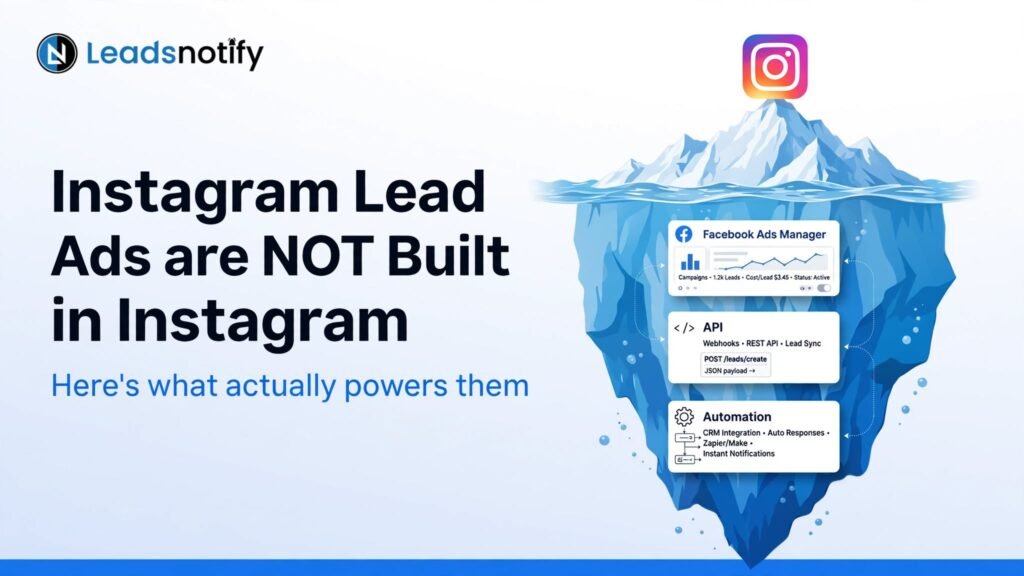
The single most useful thing to know about Instagram lead ads is that they are not an Instagram product.
There is no separate Instagram lead ad to create, no Instagram form builder, and no Instagram inbox where the leads pile up. It is one Meta lead ad with Instagram switched on as a placement.
That single fact explains most of the confusion around them, including the most common complaint we hear.
People run the ad, watch the submissions counter climb, go looking inside Instagram, and find nothing. They assume something is broken. Nothing is broken, they are just looking in the wrong place.
This guide covers the setup, what actually differs between the Instagram and Facebook versions of the same ad, and where the leads go once somebody taps submit. If you have not set up a Facebook lead ad before, our guide to creating and running Facebook/Meta lead ads covers the basics first.
What lead ads on Meta actually are
A Meta lead ad opens a form inside the app instead of sending someone to your website.
Meta pre-fills their name, email and phone from their profile, so completing it takes about two taps and no typing.
That is the whole trick, and it cuts both ways. Removing the friction is why lead ads produce volume at a low cost per lead.
It is also why a meaningful share of those leads submitted almost by accident, and will not remember doing it an hour later.
A note on names, because the search results for this topic are a mess. Instagram lead ads, Instagram lead gen ads, lead generation ads on Instagram and Meta lead ads all describe the same thing.
So does “Instagram lead form,” which is just the instant form as it appears on Instagram. There is one product with four or five common names.
Instagram enters the picture as a placement. When you build the lead ad in Meta Ads Manager, the same instant form can serve in the Instagram feed, in stories, in reels and in explore, alongside the Facebook placements.
Meta’s own documentation is direct about it: you run lead ads across both Facebook and Instagram by creating one lead ad and one instant form in Ads Manager. There is no second thing to build.
How to run ads on Instagram for leads
In Meta Ads Manager, create a campaign and choose Leads as the objective.
At the ad set level, set the conversion location to Instant forms, then select the Facebook Page you are advertising from and accept Meta’s lead ads terms. A Page is required even if you only care about Instagram, because the ad runs against it. If you have not connected a Page yet, our guide to setting up Facebook instant forms walks through it.
Check your placements next. On automatic placements, Instagram is included by default.
If you want Instagram only, switch to manual placements and select the Instagram surfaces you want, though narrowing placements usually raises your cost per lead.
Build the instant form at the ad level, then design the creative and publish.
One decision worth making deliberately: Meta offers a “more volume” form, which submits in two taps, and a “higher intent” form, which adds a review step so the person confirms their details before submitting.
On Instagram specifically, higher intent is worth testing early. Instagram placements are almost entirely phone traffic, often mid-scroll, and the accidental-submission rate on a two-tap form runs noticeably worse there than on desktop Facebook.
Video built for Reels tends to beat a repurposed image ad
Creative matters more on Instagram than most advertisers expect.
In a Meta case study, Jaguar Land Rover Italy tested video lead ads built specifically for the Reels placement, spanning Facebook and Instagram, against its usual image lead ads.
The video-in-Reels version delivered 17% more online leads at a 15% lower cost per lead, and nearly doubled quality leads at a 48% lower cost per quality lead. Results are self-reported by the advertiser, and Meta notes other advertisers’ results may vary.
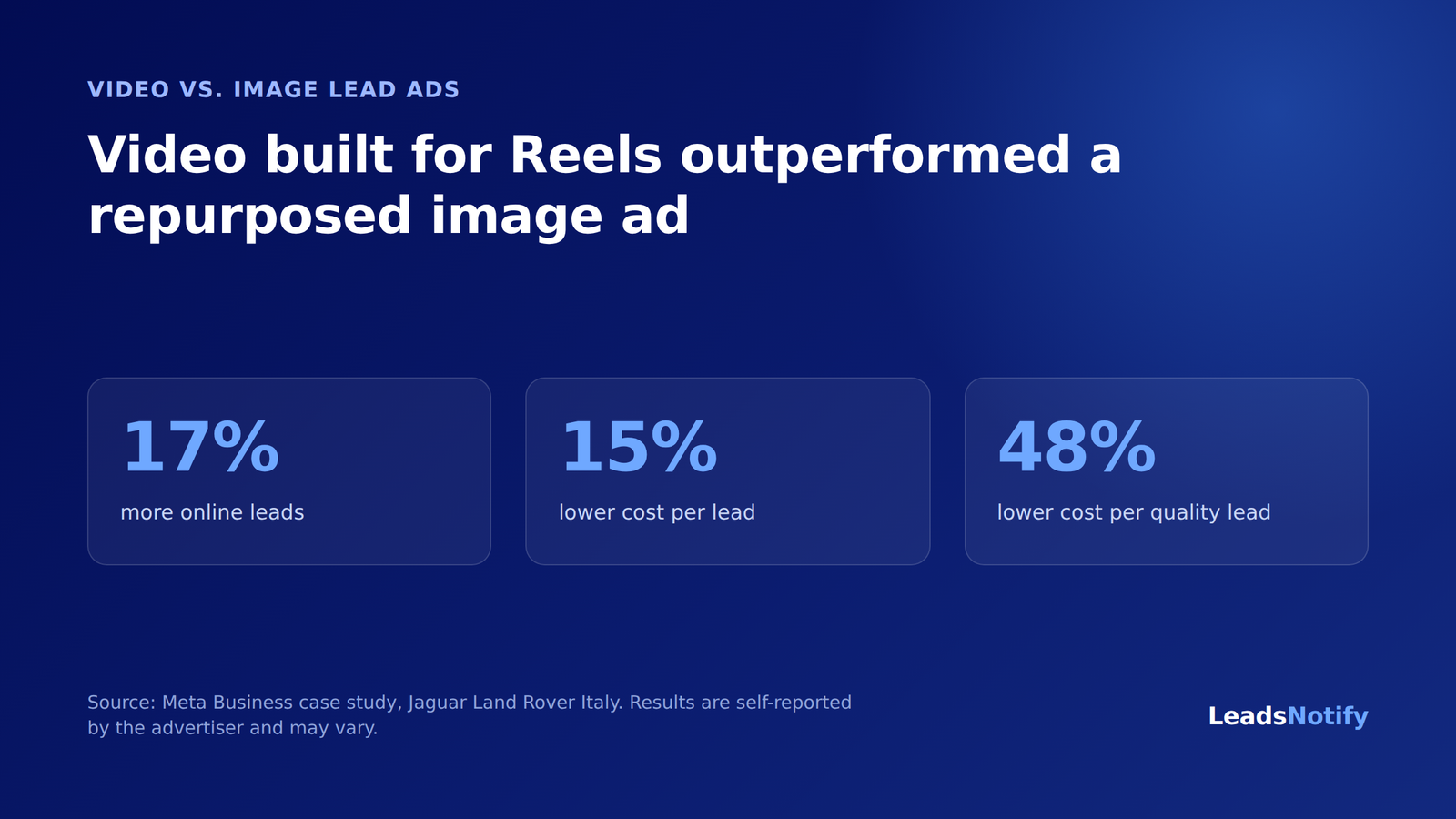
You do not need automotive-brand budgets to take the lesson. A vertical, native-feeling video built for the format tends to beat a repurposed square image ad on Instagram, because the surface itself is built for video.
Real examples from Ad Library
Meta keeps every active ad public in its Ad Library. Anyone can view and search it. You can search for any term, name or page. Active ads include creative and copy. Source: About the Meta Ad Library
1. Local dealership offers – How Ford structures it
Pattern: Short vertical video of vehicle, headline with monthly payment, CTA “Get Quote”, form asks ZIP + phone + preferred contact time.
Why it works on Instagram: Visual proof + one concrete offer. Easy to understand in 2 seconds.
→ Browse Ford’s active lead ads in Ad Library
Ad by Ford via Meta Ad Library, accessed Sep 2026. Creative belongs to advertiser, shown for commentary.
2. Real estate valuation ads
Pattern: “Another home on [Street] just sold for $X over asking. Curious what yours is worth?” Single image, form: address + timeline to sell.
Why it works: Hyper-local proof + curiosity. Uses special ad category compliant targeting.
→ Search real estate valuation ads in Ad Library
3. Solar and home-services savings offers
Pattern: “Electric bill over $150? Check if your ZIP qualifies for $0 down solar.” Creative is family + bill graphic. Form: avg bill, own/rent.
Why it works: Pain point first, not environmental pitch.
→ Search solar savings ads in Ad Library
4. Webinar and event registration
Pattern: Design webinar ad with “Sign Up” CTA, form has just name + email, thank-you screen links to calendar.
Why it works: Low friction for early-stage lead. Perfect for Instagram lead form where typing is annoying.
→ Search webinar registration ads in Ad Library
What genuinely differs on Instagram
Most of what you read treats Instagram lead ads as a separate discipline. Very little actually is.
| Facebook Lead Ad | Instagram Lead Ad | |
|---|---|---|
| Form builder | Same Instant Form | Same Instant Form |
| Where leads go | Page Leads Center | Same Page Leads Center |
| Traffic type | Mixed desktop + mobile | 100% mobile |
| Creative that wins | Square + text can work | Vertical video for Reels/Stories |
| Intent | Higher | Lower, needs Higher Intent form |
| Follow-up window | Longer | Shorter – attention decays fast |
- Creative has to earn tap harder. Stock photo with text overlay performs badly on visual surface.
- Stories and reels need vertical creative built for format, not repurposed square.
- It is phone traffic – person is holding device you are about to ring.
- Routing you set up once covers both, which is useful part of Instagram being a placement.
What does not change is the form itself: the same Meta instant form, with the same field types and qualifying-question options.
Where the lead is stored, and for how long, does not change either. Anything that reads leads from your Facebook Page picks up the Instagram submissions too, because they arrive through the same Page.
So the routing you set up once covers both, which is the useful part of Instagram being a placement rather than a product.
What they cost, and how to work out your own number
You will find Instagram cost-per-lead and CPM benchmarks quoted confidently all over the place. Treat them carefully.
They vary by industry, country, audience size, season and offer, and most published figures do not say which of those they were measured under.
A number you can trust is one you calculate. Take your average value from a closed deal, multiply by the share of these leads you actually convert (be pessimistic for pre-filled lead-form traffic), then multiply by the proportion of that value you are willing to spend to win the customer.
That gives you what a lead is worth to you. Any benchmark under that number is worth reading, and anything over it does not apply to your business, whatever the article claims.
On budget: a small daily spend is enough to learn something and rarely enough to fill a pipeline.
Meta needs volume to get an ad set out of the learning phase, and a narrow Instagram-only placement set gives it less room to work. Give a test two to three weeks before you draw conclusions from it.
Where Instagram lead ads go
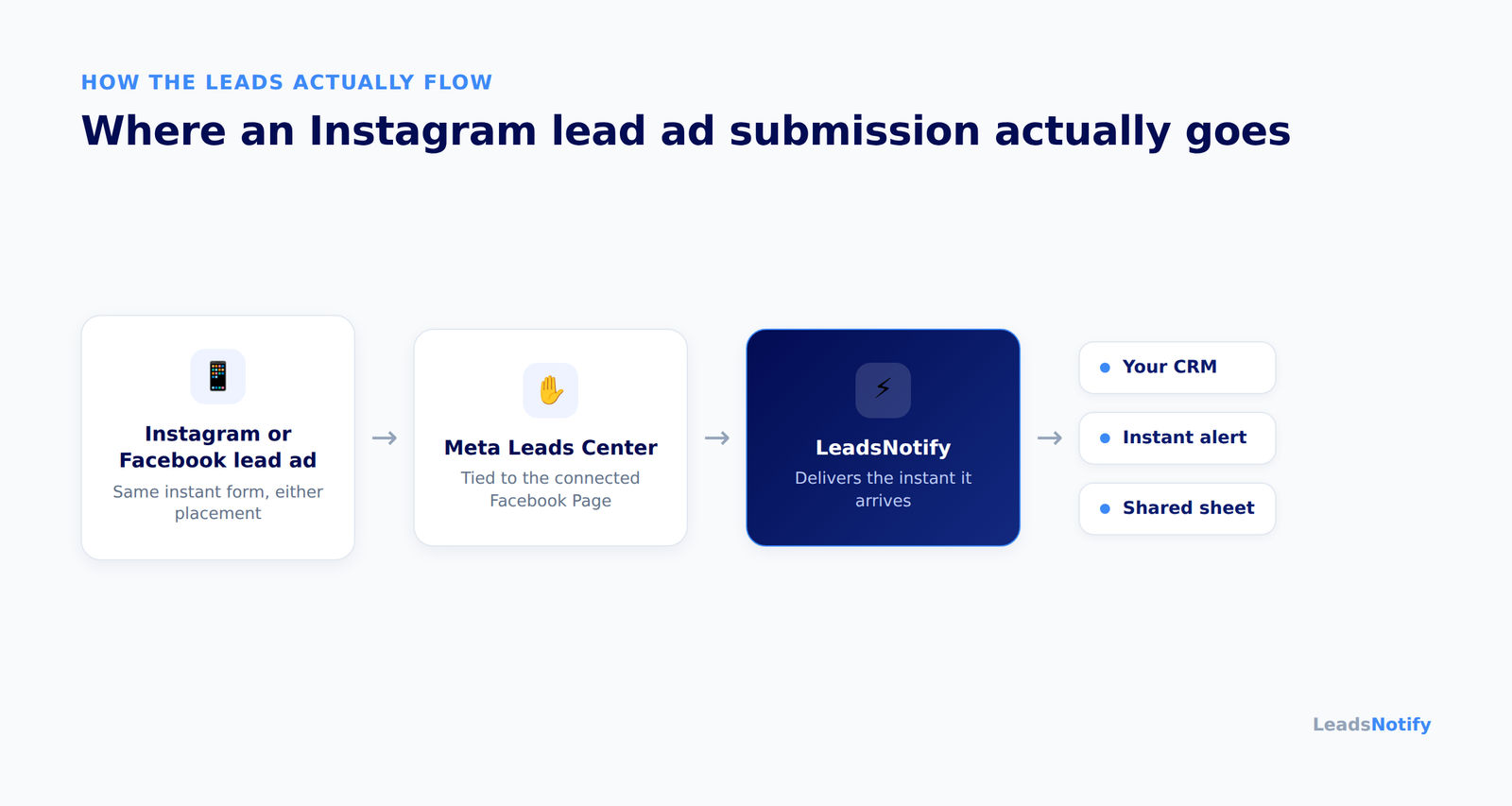
Here is the part that sends most people looking for a tool.
When somebody submits your form from an Instagram ad, the lead does not go to Instagram, your inbox, or your CRM. It goes to the connected Facebook Page’s Leads Center.
Three things are worth knowing before you spend anything. There is no notification per lead on either platform.
It is not available in the Business Suite mobile app. And Meta deletes instant form lead data after 90 days, so anything you have not exported or routed elsewhere by then is gone.
Which is how the usual pattern starts: somebody downloads a CSV every few days. Our guide to downloading leads from Facebook covers the manual process, and why the 90-day window makes it risky as your only backup.
That works in the sense that the leads eventually arrive. It also means a person who filled in your form on a Saturday evening scroll gets a call on Tuesday, by which point they have forgotten which account they tapped.
Connecting your CRM directly is the obvious answer, and it is worth knowing what “connected” means in practice.
HubSpot’s documentation states that syncing leads from a Facebook page or LinkedIn ads account can take up to two hours.
monday.com’s Meta Ads integration polls on a schedule, with daily as the default.
Neither is a criticism of those products. A two-hour sync is built for a sales cycle where two hours is nothing, and Instagram lead traffic is not that.
Getting them out automatically
What you want is the lead in your CRM and in front of a person, at the same time, within seconds of the submission. That is the job LeadsNotify does.
Meta pushes the submission across the moment the form is completed, and it goes straight out to wherever you pointed it. No polling interval, no scheduled sync, no CSV.
The setup detail specific to Instagram is a small one, and it is good news: you connect the Facebook Page, not Instagram.
Because Instagram lead ads run against that Page, one connection covers both platforms and you do not configure anything twice.
A working setup usually sends the lead into the CRM, so the record exists and your follow-up sequence starts by itself.
It also fires an instant alert to whoever is following up, with the name, number and qualifying answer inside it.
And it lands in a shared sheet, if you want a record that outlives the 90 days Meta gives you.
All three happen from the same submission, and a lead counts once however many destinations you send it to.
Pricing meters leads routed, not seats or tasks, so adding another person to the alerts does not change the bill. A custom connector is included free on every plan, including the free one.
Never lose an Instagram lead again. Start free with LeadsNotify. The free plan covers 150 leads a month with two notifiers, no card required.
Why you cannot find your Instagram leads
In rough order of how often it turns out to be the cause:
You are looking in Instagram rather than the connected Facebook Page. By far the most common one.
An expired page token. The connection worked for months and then quietly stopped, with nothing announcing it.
A missing Leads Access permission on the Page. Common when an agency runs ads on a client’s Page, or whoever set it up has left.
A duplicated instant form. You cannot edit a published form, so changing a question means duplicating it, and the old form stops receiving submissions while your connection still points at it.
A rejected record, where your CRM refused the lead because a field it requires came through empty.
All five look identical from the outside, which is why a delivery log earns its keep.
It records what your destination returned on every attempt, so you can see which one you are dealing with rather than working through them in turn.
Failed deliveries retry automatically, and you can have an email sent the moment one fails instead of finding out days later. Our instant lead failure alerts cover exactly this.
When the built-in route is enough
If you run one Page, one instant form, and your CRM has a native Meta integration you are content with, use it.
It is fewer moving parts and it is already included in something you pay for. A two-hour sync may be completely fine depending on what you sell.
Routing earns its place when you run several Pages or several clients, or you want the same lead in more than one destination at once.
It also earns its place when you want a person alerted on their phone rather than a record appearing in an app they open twice a day, or your CRM has no Meta connector at all.
FAQ
Do I need a Facebook Page to run Instagram lead ads?
Yes. The ad is created in Meta Ads Manager against a connected Facebook Page, so the Page is part of the setup even if you never post to it.
Anything reading leads from that Page picks up your Instagram submissions automatically.
Can I run lead ads on Instagram only?
Yes, by switching from automatic to manual placements and selecting only the Instagram surfaces.
Expect to pay more per lead for it, since narrowing placements gives Meta’s delivery less room to work.
Do Instagram leads arrive differently from Facebook leads?
No. Same instant form, same Page, same pipeline.
If your Facebook leads are already being routed somewhere, your Instagram leads are going to the same place.
How long does Meta keep Instagram lead data?
Ninety days, then it is deleted. If you collect leads by hand rather than routing them out, treat that as a deadline rather than a guideline.
Is there a free way to get Instagram leads out?
You can download them from the Page’s Leads Center at no cost.
If you want it to happen automatically, LeadsNotify’s free plan covers 150 leads a month with two notifiers and no card.
Are Instagram lead ads worth it?
They work well for a low-friction, early-stage enquiry, where you have something visual to show and a follow-up process ready to run.
They work badly as a source of ready-to-buy customers, and very badly if nobody follows up quickly. The channel is rarely the problem, the gap between the submission and the first call usually is.
Last Updated on September 1, 2026 by Akash Mehra
Set up a free notification in a few minutes.

Abdullah Khan
A Technical Lead and backend architect with 10+ years of experience building reliable, high-scale APIs and automation systems. At LeadsNotify, he helps build and maintain the integrations that route Facebook and LinkedIn leads to email, CRMs, and marketing tools in real time.
Connect on LinkedIn ↗